- _nosay
App数据传输安全篇(2)
2017-08-18 11:51:27
首先我们需要在配置文件,也就是.env文件中指定公钥,和私钥,分别建立两个字段RSA_PUBLIC,和RSA_PRIVATE,填入我们的公钥和私钥
在app/Repositorie中建立RsaRepository.php文件,用于加密和解密,内容如下
<?php
/**
 * Created by PhpStorm.
 * User: nosay
 * Date: 17-8-17
 * Time: 下午1:35
 */

namespace App\Repositories;


class RsaRepository
{
    private $pubKey;
    private $priKey;

    /**
     * RsaRepository constructor.
     * @param $pubKey
     * @param $priKey
     */
    public function __construct()
    {
        $public_key = env('RSA_PUBLIC');
        $pemPubKey = chunk_split($public_key, 64, "\n");
        $pubKey = "-----BEGIN PUBLIC KEY-----\n".$pemPubKey."-----END PUBLIC KEY-----\n";

        $private_key = env('RSA_PRIVATE');
        $pemPriKey = chunk_split($private_key, 64, "\n");
        $priKey = "-----BEGIN RSA PRIVATE KEY-----\n".$pemPriKey."-----END RSA PRIVATE KEY-----\n";

        $this->private =  openssl_pkey_get_private($priKey);
        $this->pubKey = openssl_pkey_get_public($pubKey);
    }

    public function encrypt($str)
    {
        openssl_public_encrypt($str,$encrypted,$this->pubKey);//公钥加密
        $encrypted = base64_encode($encrypted);
        return $encrypted;

    }

    public function decrypt($str)
    {
        openssl_private_decrypt(base64_decode($str),$decrypted,$this->private);//私钥解密
        return $decrypted;
    }

}
这样我们在控制器中,就可以愉快的加密和解密啦
   public function getSmsCode(Request $request)
{

    $encodeStr = $request->get('data');
    $decodeStr = $this->rsa->decrypt($encodeStr);
    if($decodeStr)
    {
        $data['status'] = 1;
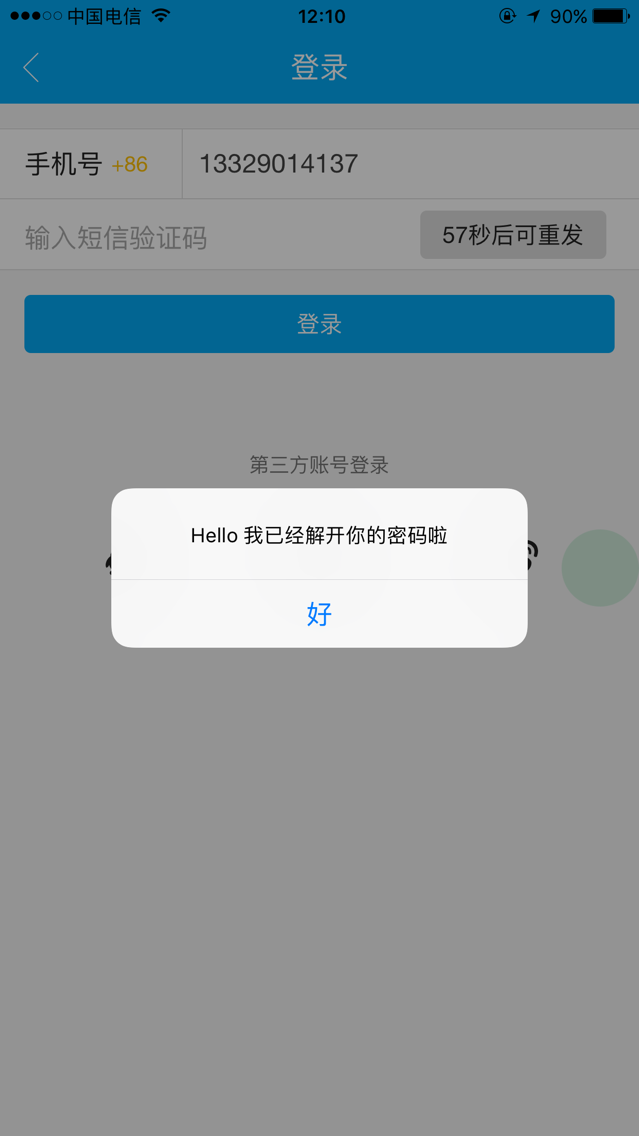
        $data['message'] = "Hello 我已经解开你的密码啦";
        $sendStr['data'] = $this->rsa->encrypt(json_encode($data));
        $sendStr['status'] = 1;
        return response()->json($sendStr);

    }else{
        return response()->json(['status'=>0,'message'=>'解密失败']);
    }
}
接下来我们在相应的apicloud文件中,添加相应的解密模块,login.js内容为
function setLeftTime() {
        var second = Math.floor(leftsecond);
        $("#verify_code").html(second + "秒后可重发");
        $('#verify_code').removeClass('aui-btn-info');
        leftsecond--;
        if (leftsecond < 1) {
            clearInterval(timer);
            try {
                $("#verify_code").html("获取验证码");
                $('#verify_code').attr("onclick", 'sendMobileValidSMSCode()');
                $("#mobile").removeAttr("readonly");

            } catch (E) {
                console.log('error');
            }
            return;
        }
    }

    function sendMobileValidSMSCode() {
        var mobile = $('#mobile').val();
        var mbTest = /^(13|14|15|17|18)[0-9]{9}$/;
        if (mbTest.test(mobile)) {
            leftsecond = 60;
            timer = setInterval(setLeftTime, 1000);
            $("#mobile").attr("readonly", true);
            var url = serverUrl + "/api/qiuhan/getSmsCode";
            var postStr = {"phone":mobile};
            rsaEncodeAndSend(url,JSON.stringify(postStr));

        } else {
            api.toast({
                msg: '请输入正确的手机号码!',
                duration: 2000,
                location: 'bottom'
            });

        }
    }

    function rsaDecode(str) {
      var signature = api.require('signature');
      signature.rsaDecode({
          data: str,
          privateKey: 'widget://res/rsa/private_key.p12',
          password:'xxxxxx'
      }, function(ret) {
          if(ret.status)
          {
            var temp = JSON.parse(ret.value)
            alert(temp.message);
          }

      });
    }


    apiready = function() {
        api.parseTapmode();
        $('#verify_code').click(function() {
            sendMobileValidSMSCode();
        });
    };
rsa.js内容如下
    function rsaEncodeAndSend(url, postStr) {
        var signature = api.require('signature');
        signature.rsa({
            data: 'hello world',
            publicKey: 'widget://res/rsa/public_key.der'
        }, function(ret) {
            if (ret.status) //如果加密成功
            {
                api.ajax({
                    url: url,
                    method: 'post',
                    data: {
                        values: {
                            data: ret.value
                        },
                    }
                }, function(ret, err) {
                    if (ret) {
                        if (ret.status) {
                            rsaDecode(ret.data);
                        } else {
                            console.log(ret.message);
                        }
                    } else {
                        alert(JSON.stringify(err));
                    }
                });
            } else {
                console.log('加密失败')
            }


        });
    }
测试一下,
抓包看一下发送的数据,以及响应的数据,
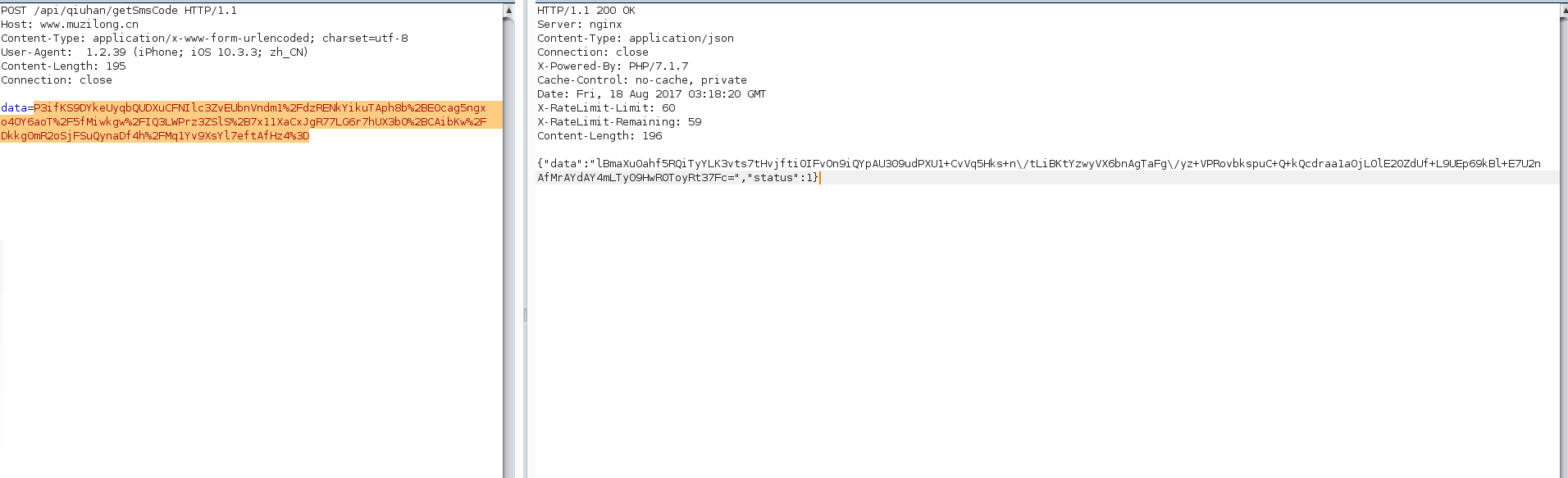
简直完美